In the interest of security, I was thinking it would be most beneficial if this task had the inverse option for listing the ScreenConnect Fingerprints that you want to KEEP and uninstalling all others. I’m not a script writer but I would think this could be done pretty easily, yes?
I agree! We actually made a custom task a while back to do that exact thing!
You just need to make a new task give it a name, then set a parameter called:
ExpectedSiteGuids
You can put the guids you want to keep using commas to separate them. (Make sure to test the task on a test machine first to make sure you are targeting the right fingerprints!!!)
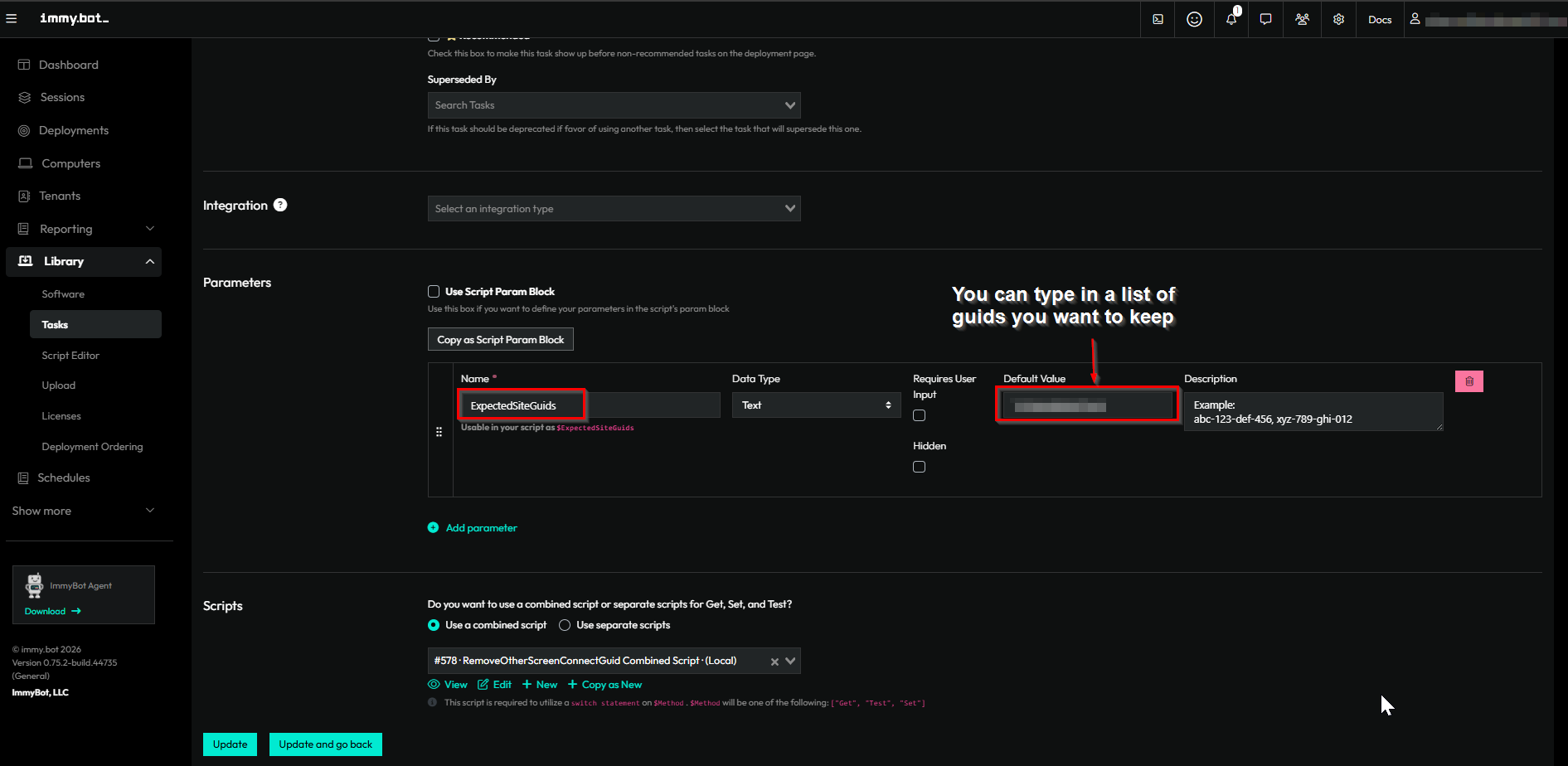
Then chose a new combined script. Select System for the context and below is the code we used. (Feel free to take a look)
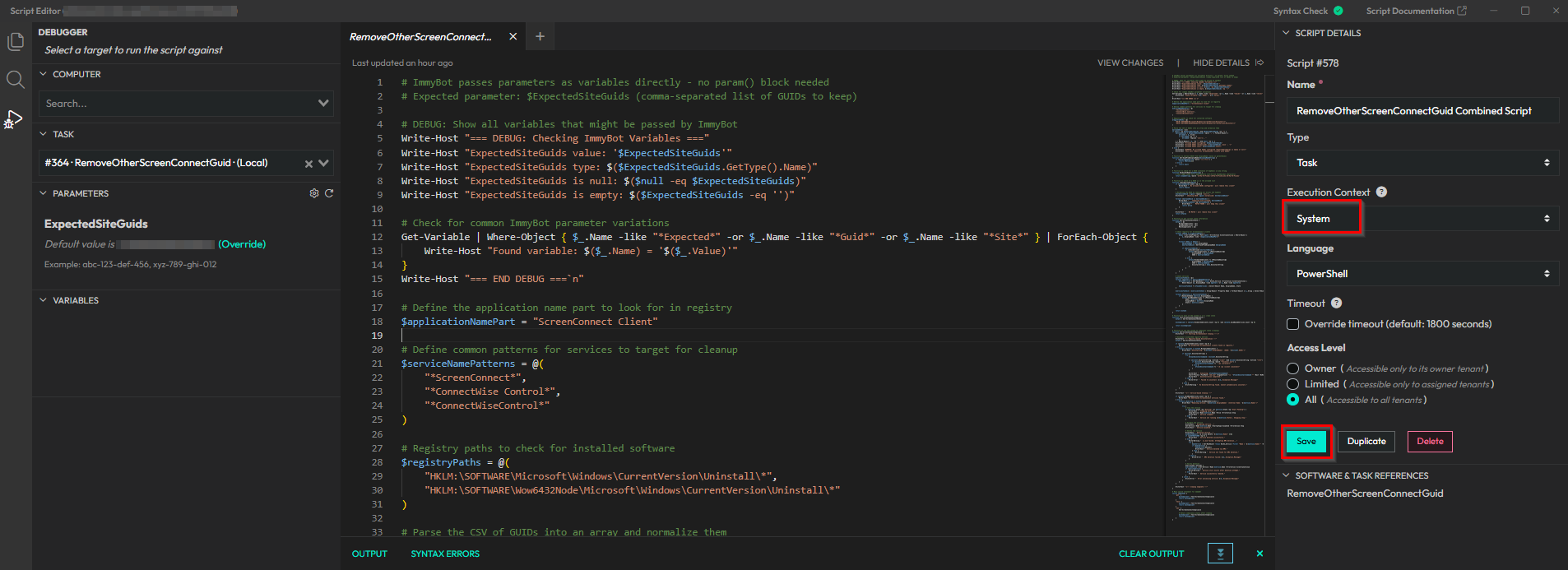
# ImmyBot passes parameters as variables directly - no param() block needed
# Expected parameter: $ExpectedSiteGuids (comma-separated list of GUIDs to keep)

# DEBUG: Show all variables that might be passed by ImmyBot
Write-Host "=== DEBUG: Checking ImmyBot Variables ==="
Write-Host "ExpectedSiteGuids value: '$ExpectedSiteGuids'"
Write-Host "ExpectedSiteGuids type: $($ExpectedSiteGuids.GetType().Name)"
Write-Host "ExpectedSiteGuids is null: $($null -eq $ExpectedSiteGuids)"
Write-Host "ExpectedSiteGuids is empty: $($ExpectedSiteGuids -eq '')"

# Check for common ImmyBot parameter variations
Get-Variable | Where-Object { $_.Name -like "*Expected*" -or $_.Name -like "*Guid*" -or $_.Name -like "*Site*" } | ForEach-Object {
    Write-Host "Found variable: $($_.Name) = '$($_.Value)'"
}
Write-Host "=== END DEBUG ===`n"

# Define the application name part to look for in registry
$applicationNamePart = "ScreenConnect Client"

# Define common patterns for services to target for cleanup
$serviceNamePatterns = @(
    "*ScreenConnect*",
    "*ConnectWise Control*",
    "*ConnectWiseControl*"
)

# Registry paths to check for installed software
$registryPaths = @(
    "HKLM:\SOFTWARE\Microsoft\Windows\CurrentVersion\Uninstall\*",
    "HKLM:\SOFTWARE\Wow6432Node\Microsoft\Windows\CurrentVersion\Uninstall\*"
)

# Parse the CSV of GUIDs into an array and normalize them
$allowedGuids = @()
if ($null -ne $ExpectedSiteGuids -and $ExpectedSiteGuids -ne "") {
    $allowedGuids = $ExpectedSiteGuids -split ',' | ForEach-Object {
        $trimmed = $_.Trim()
        if ($trimmed -ne "") {
            $trimmed -replace '[{}\-]', ''
        }
    } | Where-Object { $_ -ne "" -and $null -ne $_ }
    Write-Host "Allowed GUIDs configured: $ExpectedSiteGuids"
    Write-Host "Allowed GUIDs (normalized): $($allowedGuids -join ', ')"
    Write-Host "Allowed GUIDs count: $($allowedGuids.Count)"
} else {
    Write-Host "WARNING: No allowed GUIDs configured (ExpectedSiteGuids is empty or null)"
    Write-Host "This will remove ALL ScreenConnect clients with GUIDs"
}

# Function to extract GUID from DisplayName (value in parentheses)
function Get-GuidFromDisplayName($displayNameString) {
    if ($displayNameString -match '\((.+?)\)') {
        return $Matches[1]
    } else {
        return $null
    }
}

# Function to check for a GUID (presence of hyphens) in any string
function HasGuidInName($nameString) {
    # This regex looks for a GUID pattern (8-4-4-4-12 hexadecimal characters)
    return $nameString -match '[0-9a-fA-F]{8}(-[0-9a-fA-F]{4}){3}-[0-9a-fA-F]{12}'
}

# Function to check if a GUID is in the allowed list
function IsGuidAllowed($guid) {
    if ($allowedGuids.Count -eq 0) {
        Write-Host "  No allowed GUIDs configured - will remove this client"
        return $false
    }

    # Normalize the GUID by removing all braces and hyphens
    $normalizedGuid = $guid -replace '[{}\-]', ''
    Write-Host "  Checking GUID: $guid (normalized: $normalizedGuid)"

    foreach ($allowedGuid in $allowedGuids) {
        Write-Host "    Comparing with allowed: $allowedGuid"
        if ($normalizedGuid -eq $allowedGuid) {
            Write-Host "    MATCH FOUND - will keep this client"
            return $true
        }
    }

    Write-Host "    NO MATCH - will remove this client"
    return $false
}

# Function to get current state information
function Get-ScreenConnectState {
    $state = @{
        MismatchedClients = @()
        GuidBasedServices = @()
        MatchingClients = @()
    }

    # Check registry for ScreenConnect clients
    foreach ($path in $registryPaths) {
        $keys = Get-ItemProperty -Path $path -ErrorAction SilentlyContinue | Where-Object {
            $_.DisplayName -like "*$applicationNamePart*"
        }

        foreach ($key in $keys) {
            $displayName = $key.DisplayName
            $extractedGuid = Get-GuidFromDisplayName $displayName

            if ($extractedGuid) {
                if (IsGuidAllowed $extractedGuid) {
                    $state.MatchingClients += [PSCustomObject]@{
                        DisplayName = $displayName
                        GUID = $extractedGuid
                    }
                } else {
                    $state.MismatchedClients += [PSCustomObject]@{
                        DisplayName = $displayName
                        GUID = $extractedGuid
                        UninstallString = $key.UninstallString
                    }
                }
            }
        }
    }

    # Check services
    $servicesToCheck = @()
    foreach ($pattern in $serviceNamePatterns) {
        $foundServices = Get-WmiObject -Class Win32_Service -ErrorAction SilentlyContinue |
            Where-Object {$_.DisplayName -like $pattern -or $_.Name -like $pattern}

        $servicesToCheck += $foundServices | Select-Object Name, DisplayName, State
    }

    $servicesToCheck = $servicesToCheck | Group-Object -Property Name | ForEach-Object { $_.Group | Select-Object -First 1 }

    foreach ($service in $servicesToCheck) {
        if (HasGuidInName $service.DisplayName) {
            $state.GuidBasedServices += [PSCustomObject]@{
                Name = $service.Name
                DisplayName = $service.DisplayName
                State = $service.State
            }
        }
    }

    return $state
}

# Function to test if the system is in a clean state
function Test-ScreenConnectCompliance {
    $state = Get-ScreenConnectState

    $isCompliant = ($state.MismatchedClients.Count -eq 0) -and ($state.GuidBasedServices.Count -eq 0)

    return $isCompliant
}

# Function to set the system to compliant state (cleanup)
function Set-ScreenConnectCompliance {
    Write-Host "--- Starting ScreenConnect Cleanup ---`n"

    # Uninstall mismatched registry entries
    Write-Host "--- Registry-based Uninstallation ---"
    $state = Get-ScreenConnectState

    if ($state.MismatchedClients.Count -eq 0) {
        Write-Host "No mismatched ScreenConnect clients found in registry."
    } else {
        foreach ($client in $state.MismatchedClients) {
            Write-Host "Uninstalling: '$($client.DisplayName)' (GUID: '$($client.GUID)')"

            if ($client.UninstallString) {
                try {
                    $finalUninstallCommand = $client.UninstallString

                    if ($client.UninstallString -notlike "*/qn*" -and $client.UninstallString -notlike "*/S*") {
                        if ($client.UninstallString -match "^msiexec\.exe") {
                            $finalUninstallCommand += " /qn /norestart"
                        } else {
                            $finalUninstallCommand += " /S /qn /silent /uninstall"
                        }
                    }

                    Write-Host "  Executing: $finalUninstallCommand"
                    Start-Process -FilePath "cmd.exe" -ArgumentList "/c `"$finalUninstallCommand`"" -Wait -NoNewWindow -ErrorAction SilentlyContinue
                    Write-Host "  Uninstallation completed."
                } catch {
                    Write-Error "  Failed to uninstall: $($_.Exception.Message)"
                }
            } else {
                Write-Warning "  No UninstallString found. Cannot automatically uninstall."
            }
        }
    }

    Write-Host "`n--- Service-based Cleanup ---"

    if ($state.GuidBasedServices.Count -eq 0) {
        Write-Host "No GUID-based ScreenConnect services found."
    } else {
        foreach ($service in $state.GuidBasedServices) {
            Write-Host "Removing service: '$($service.DisplayName)' (Internal Name: '$($service.Name)')"

            try {
                # Stop the service
                if ($service.State -eq "Running" -or $service.State -eq "Start Pending") {
                    Write-Host "  Stopping service..."
                    Stop-Service -Name $service.Name -Force -ErrorAction Stop
                    Write-Host "  Service stopped."
                } else {
                    Write-Host "  Service not running ($($service.State)). Skipping stop."
                }

                # Disable the service
                Write-Host "  Disabling service..."
                Set-Service -Name $service.Name -StartupType Disabled -ErrorAction Stop
                Write-Host "  Service disabled."

                # Delete the service
                Write-Host "  Deleting service..."
                $scDeleteResult = & sc.exe delete "$($service.Name)" 2>&1
                if ($LASTEXITCODE -eq 0) {
                    Write-Host "  Service deleted successfully."
                } else {
                    Write-Warning "  sc.exe failed. Attempting WMI deletion..."
                    try {
                        $wmiService = Get-WmiObject -Class Win32_Service -Filter "Name = '$($service.Name)'" -ErrorAction SilentlyContinue
                        if ($wmiService) {
                            $wmiService.Delete()
                            Write-Host "  Service deleted via WMI."
                        } else {
                            Write-Warning "  Service not found for WMI deletion."
                        }
                    } catch {
                        Write-Error "  WMI deletion failed: $($_.Exception.Message)"
                    }
                }

                # Verify deletion
                Start-Sleep -Seconds 1
                $verifyService = Get-Service -Name $service.Name -ErrorAction SilentlyContinue
                if ($verifyService) {
                    Write-Warning "  Service still exists after deletion attempt."
                } else {
                    Write-Host "  Service successfully removed."
                }
            } catch {
                Write-Error "  Error processing service: $($_.Exception.Message)"
            }
        }
    }

    Write-Host "`n--- Cleanup Complete ---"
}

# Main switch statement for ImmyBot
switch ($method) {
    'get' {
        $isCompliant = Test-ScreenConnectCompliance
        return $isCompliant
    }
    'test' {
        $isCompliant = Test-ScreenConnectCompliance
        return $isCompliant
    }
    'set' {
        Set-ScreenConnectCompliance

        # Return compliance status after cleanup
        $isCompliant = Test-ScreenConnectCompliance
        return $isCompliant
    }
}
Also, here is a simple PowerShell script you can run on the test machine to see what Screen Connect fingerprints are present:
# Simple script to find all ScreenConnect Client GUIDs on this system

$registryPaths = @(
    "HKLM:\SOFTWARE\Microsoft\Windows\CurrentVersion\Uninstall\*",
    "HKLM:\SOFTWARE\Wow6432Node\Microsoft\Windows\CurrentVersion\Uninstall\*"
)

Write-Host "=== ScreenConnect Clients Found ===" -ForegroundColor Cyan
Write-Host ""

$found = $false

foreach ($path in $registryPaths) {
    $keys = Get-ItemProperty -Path $path -ErrorAction SilentlyContinue | Where-Object {
        $_.DisplayName -like "*ScreenConnect Client*"
    }

    foreach ($key in $keys) {
        $found = $true
        $displayName = $key.DisplayName

        # Extract GUID from DisplayName (value in parentheses)
        if ($displayName -match '\((.+?)\)') {
            $guid = $Matches[1]
            Write-Host "Display Name: $displayName" -ForegroundColor Green
            Write-Host "GUID:         $guid" -ForegroundColor Yellow
            Write-Host ""
        }
    }
}

if (-not $found) {
    Write-Host "No ScreenConnect Clients found on this system." -ForegroundColor Red
}
After looking at the default task more, maybe it does this already? The task is called “Remove Unknown ScreenConnect” and the variables are “KnownFingerprints” so does it remove any ScreenConnect that is not in this list?